 LidLid
Close the lid.
Carry on.
Codex or Claude Code is still working, but you need to go. Keep local work running while you close your MacBook and take it with you.
Apple Silicon · macOS 14+ · Open-lid mode is always free

- Codex
- Claude Code
- Builds
- Downloads
Less balancing.
More moving.
Stop carrying an open laptop in both hands. Move to another room, change desks, or head out with a little more freedom.

Illustrated on-the-go scenes. Online tasks still need a working connection.
One session. Then back to normal.
Turn it on for this lid close. Reopening ends the session. Switch it on again next time you need it.
No external monitor needed.
Made for Apple Silicon MacBooks. Works on battery, so you can move with just your laptop.
A little more peace of mind.
Choose a time limit. Sessions end at 10% on battery power or on serious thermal pressure.
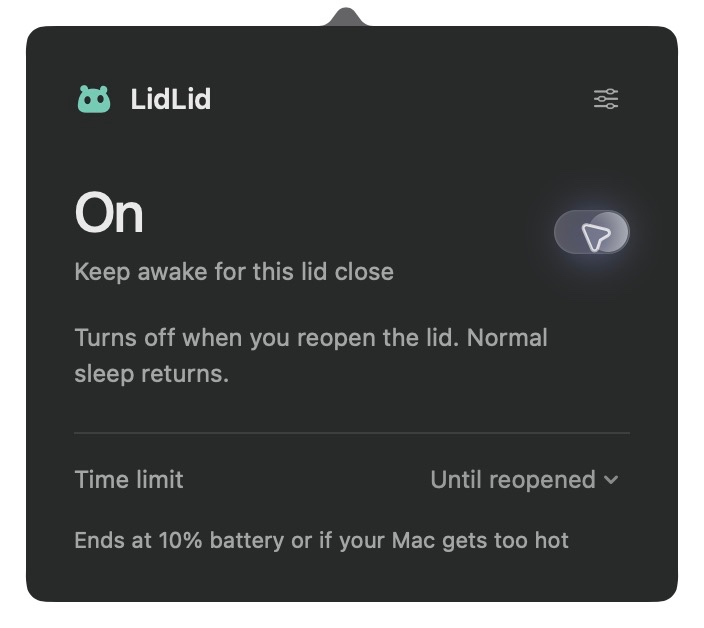
Actual interface preview. Select a state to view it.
Keep going.
Then let it rest.
Open the LidLid icon in your menu bar and switch on. When you return and reopen the lid, LidLid goes back to Off.
- Eyes open for On. Eyes closed for Off.
- English and Chinese, ready when you are.
- Open-lid mode is free. Try closed-lid mode for 7 days.
Ready to go in three steps.
Install LidLid and its free compatibility component. Then get ready to go.
- 01
Install LidLid.
Get the main app from the Mac App Store. The store link will be available after launch.
- 02
Set up once.
Choose Set up free compatibility component in LidLid, follow its one-time setup, then claim your trial or unlock it for life.
- 03
Switch on. Close. Go.
Start your task and turn on closed-lid mode. Wait for On. Reopening ends the session automatically.
Need help with the first launch? Read the setup guide
Will Codex and Claude Code keep running with the lid closed?
LidLid is for Codex, Claude Code, builds and downloads running locally on your Mac. It keeps your Mac awake for this session. Tasks still need their required internet connection and user approvals. Jobs already running in the cloud can run independently.
Do I need power or an external monitor?
No external monitor is needed, and LidLid can run on battery. The current version is for Apple Silicon MacBooks without an external display connected. A session ends at 10% on battery power.
Is LidLid available on the Mac App Store?
The Mac App Store version is being prepared for launch. We will add its link here when available. The DMG on this site contains only the free compatibility component and requires the LidLid main app.
Your task carries on.
So can you.
Make your next move with a little less waiting.
Mac App Store version in preparation